I turned on my computer today and the WiFi icon indicated it was turned off. I clicked it in order to open up the drop down menu from which I could turn on the WiFi. However, in place of all the typical options, there was a grayed out message, "WiFi: No Hardware Installed." This was hard to believe, since there was in fact a WiFi card installed only hours before.
I searched the internet and found two things: this problem was widespread (although more common on iMacs), and the solution is all about shut down options.
The Solution: when you open the shut down dialog, by pressing control + eject, there is a checkbox regarding whether the operating should return the computer to its state prior to shutdown. Unchecking that option and restarting solves the problem.
Steps:
- Open the shut down dialog
- Uncheck the option
- Restart the computer


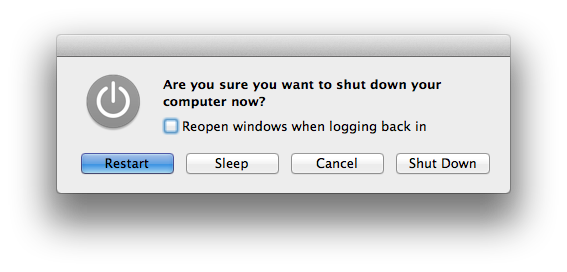
Voila! You're problem is solved. Reenabling that option after the problem is fixed will not necessarily bring back the problem, so feel free to re-enable it.

It sounded so good and easy.... unfortunately. It is not working for me. (The option does not remain unchecked after restart. Do not know if that makes a different)
ReplyDeleteThanks,
Terry
Thanks a lot! That worked for me! cheers bro
ReplyDeleteTHANK YOU!! It worked! I was freaking out that someone at school had broken it!
ReplyDeleteWowwwww, it worked! Magic, so simple. I was scared out when the wifi out of work. Thanks!
ReplyDeleteThat didn't work for me
ReplyDeleteSo easy... doesn't work.
ReplyDeleteFirst time it worked for several days, then "hardware not installed again" and this not worked anymore...
ReplyDeleteDidn't work for me on my MacBook Air
ReplyDeleteHas anyone figured out what app causes it?
ReplyDeleteTried it and it didn't work for me as well :(
ReplyDeleteThis keeps happing every so often :(
Easytechy, US-based an independent Tech Support Agency offers on-demand technical support for Computer, Tablets, PC, Laptop, Mobile, Gaming, Hardware and Installation Services.
ReplyDeleteEasytechy Hardware Installation Services | Las Vegas, Nevada - 89146 | Tech Support Number: 1-855-859-0057
God bless it worked for me
ReplyDeleteGod bless it worked for me
ReplyDeleteIt worked!!! Thanks!!! In 2016 still!!!
ReplyDeleteIt worked!!! Thanks!!! In 2016 still!!!
ReplyDeletemmm soo useful like i'm soo telling the truth
ReplyDeletemmm soo useful like i'm soo telling the truth
ReplyDeleteI want to add my kudos to you! This worked like a charm. I looked like a freaking HERO!! Thanks $1B - yeah that's with a B...
ReplyDeleteSo desperate and finally tried this but but it never bring back THAT wifi.
ReplyDelete2009 macbook pro on capitan.
So desperate and finally tried this but but it never bring back THAT wifi.
ReplyDelete2009 macbook pro on capitan.
+1 it didnt work for me too
ReplyDeleteHi. I have mac air 2008. I downgraded it to windows 7. It was working fine but after fee days my wifi isn't working. How can i fix this?
ReplyDeleteHi. I have mac air 2008. I downgraded it to windows 7. It was working fine but after fee days my wifi isn't working. How can i fix this?
ReplyDeleteI deleted my wifi accidentally and I can't replace it how can I fix this issue?
ReplyDelete